/a/
FaceCuePerformance Studio
Drives the whole face from your dialogue.
The mouth, the eyes, the emotion, the head and the breath. Every part is optional, so you can take the lip sync on its own or the whole performance.
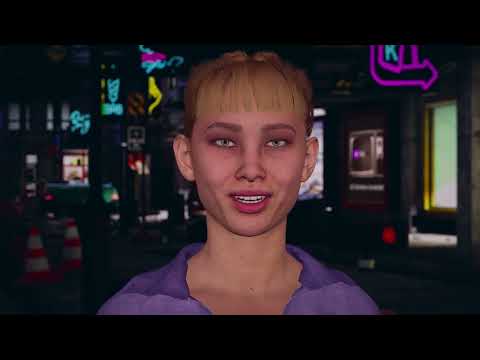
See It Move
A minute of a face doing all of this at once, with nothing animated by hand. The demos are on the same page if you would rather drive it yourself.
What It Is
Cues, Not Clips
A bake does not produce an animation clip full of keyframes. It produces cues, a set of instructions the runtime face reads, forming each shape by the same rules speech itself follows. The baking happens offline, so a line plays back the same way every time. When audio cannot be baked, the same face runs live instead.
The target was standalone VR, where a face sits an arm's length from the player and the whole thing runs on a mobile chip. That asks for detail you can inspect from inches away and for it to cost almost nothing, which are opposite demands.
FaceCue answers both, and every character carries the dials to sit anywhere between them.
The mouth, the emphasis, the emotion, the eyes and the breath are separate systems. Give a crowd the lip sync alone and the character being spoken to the whole performance, in one scene.
Controls sit in Basic, Advanced and Expert, and the last two stay out of your way until you go looking.
How often a face simulates and how often it reaches the rig are set separately, so a hero runs at full quality while a crowd runs at a fraction of it. A face nobody can see stops simulating at all.
Identical characters each take their own randomness, so a crowd does not blink in unison.
The Mouth
How the Lip Sync Works
Bake once in the editor and nothing analyses audio at runtime, it only reads the cues. The expensive half is already done, and the face is still driven live from them. The Cue Baker.
Point it at audio with nothing prepared: a microphone, voice chat, speech made at runtime. One live mode reads visemes and shapes them the way the baked path does, the other follows loudness alone. Live Speech.
Sounds are shaped by their neighbours, never stepping between fixed poses. Blending alone smooths away what makes speech readable, so linguistic rules hold on to what has to land. Speech.
The Rest of the Face
What Makes It a Performance Studio
FaceCue works out which words are being leant on and carries that continuously through the head and the brows. It weighs how a line was delivered against how it was written, because neither alone says where the weight fell. Emphasis.
Twenty-eight named emotions, each already tuned and each yours to reshape. Write one into the transcript and let the baker place it, or bring it from a Timeline track, your own code, or a mood sitting underneath everything. Emotion.
Two engines. One keeps what a character means to look at separate from what its body has managed, so looking back is a movement and never a snap. The other aims straight down the chain, familiar and predictable. Gaze.
A face at rest is never still. The eyes drift and hold, lids trail a fast look, blinks keep their own schedule, and the head sways and rights itself as the body moves. A breath cycle runs under all of it. Breath.
This is the part a feature list cannot show. The pieces above are not four effects layered over a talking head. They read the same speech and they read each other.
Emphasis is not sprinkled on at random, and it is not decided by the words alone. It follows the whole rhythm, so a pause is not dead air, and the head settles through it the way a speaker's does.
Emotion lands with the speech instead of across it, blending through the seams where the voice closes. The eyes and the idle behaviours take their cue from both: what a character is feeling and what it is saying change how often it looks away and how it settles between looks. Breath sits under everything, holding low through a line and drawing a refill in the gap after it.
Each part has a chapter of its own, starting at Core.
Setting Up
Getting Your Character Talking
Most lip sync is a sealed box between the audio going in and the shapes coming out. When it looks wrong there is nothing to inspect, so you change a number and hope. FaceCue is built the other way round. Every stage is laid out where you can see it, scrub it and change it, and the setup that gets you there is a few steps rather than an afternoon.
Drop a character in and step through. FaceCue works out which family the rig belongs to, says how confident it is and how much of the rig it matched, then builds every map. On a supported rig you can usually accept each step and be finished.
Every character drives its shapes through a map, and here you can open and tune one. Matching shapes are found across every renderer, so the face, a beard, the brows and the eyelashes move together without being mapped one at a time.
The box, opened. A loaded clip is drawn as a stack of rows, one per stage, from the raw baked data through to the shapes reaching the rig. Scrub either direction, edit cues in place, drag their edges, undo anything.
Phoneme, emotion cue and gaze tracks, plus a watcher that drives the face straight from a Timeline audio track, for scenes you are already cutting there.
Families supported: MetaHuman (DNA-263 and ARKit-52), Character Creator and iClone, Daz, Ready Player Me, Rocketbox, Synty Sidekicks and VRoid, plus Generic ARKit. Anything else maps by hand, and more can be requested.
Making the Lines
The Cue Baker and the Speech Production Tools
The baker turns a recording into cues. The speech tools exist so that a missing recording, a missing script or the wrong language does not stop you reaching one.
Audio goes in, optionally with its transcript, and cues come out beside the clip. Do one line or point it at a folder and let it work through them. Run it on the CPU, or on a GPU backend if the machine has one.
Mark a span and the baker places the emotion for you:
This is a <Proud>great place to live</Proud>!
The result is the same editable thing you would have built by hand in
the Cue Clip Composer.
Transcript Tags.
Text to speech across twenty-three languages, custom voices and a voice changer, all inside the editor and running locally on your machine. No audio? Make it from the transcript. No transcript? Make one from the audio.
The point of having them in one place is that the gaps join up. A line with no recording can be spoken by a generated voice and baked from that. A recording with no script can have one made from the audio and then bake through the more accurate path that having a script unlocks.
A line that exists in one language can be taken into another and baked there, so a second language is a pass through the same tools instead of a second production. Which of the language paths that bake takes depends on the language, and Language Support sets out which is which.
All of it runs in the editor on local models, downloaded once, on demand, and only the ones you use.
Languages
Ten Tuned, Fifty More Supported, and a Path for Anything Else
The rules that keep speech readable are tuned per language, because languages do not behave alike. Ten have that tuning of their own.
- English
- French
- German
- Greek
- Japanese
- Korean
- Mandarin
- Portuguese
- Russian
- Spanish
Fifty more run on a multilingual decoder with no setup, and a universal path reaches anything else. Check a language.
Before You Buy
What It Needs
The Dialogue System and Articy integrations are partial and experimental. The roadmap says where they stand. The documentation goes through all of this in depth.