Backends
Which part of your computer does the heavy lifting during a bake, how to switch, and what happens if a backend misbehaves.
A bake runs a speech model over your audio, which is the expensive part of the whole tool. Where that model runs is a straight speed choice, and it changes nothing about the result.
CPU, DirectML and CUDA
| Backend | Runs on | When to pick it |
|---|---|---|
| CPU | Every machine | The safe first choice, and the fallback if a GPU backend is left in a bad state |
| DirectML | Any modern graphics card | Faster than CPU on most machines |
| CUDA | NVIDIA cards | Considerably faster still |
Both GPU backends ship with FaceCue. There is nothing to install and no vendor SDK to chase.
FaceCue ships with both switched off, so an install bakes on CPU until you decide otherwise. That is slower and it always works, which is the right way round for something you meet before you have configured anything.
Picking One
The baker's Backend dropdown says which one this bake should use, and the status dots beneath it say which are actually available on this machine. Verify re-checks and updates them.
Only one GPU backend can be active in the editor at a time, and making one active is a separate step from selecting it. You do that in the Execution Provider window, from FaceCue ▸ Cue Baker Tools ▸ Execution Provider.
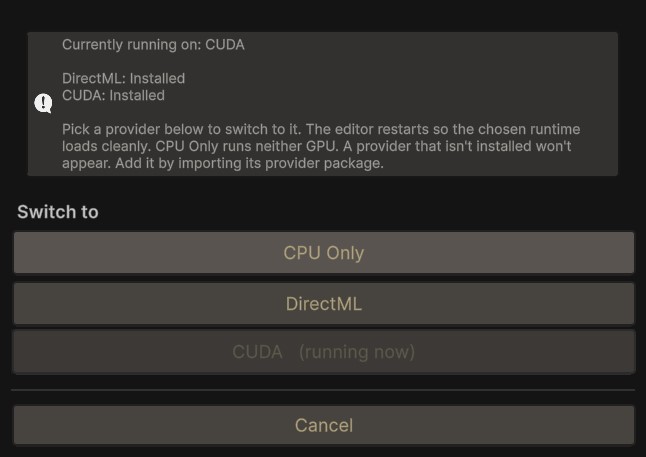
If you select a backend that is not the active one, the baker tells you so and points at that window rather than failing at bake time. CPU is never in this situation, because it runs on whatever is loaded.
The Editor Restart
Switching the active provider restarts the editor.
That is not caution. It is how the underlying runtime works: it binds to a provider once, in a fresh process, and cannot be moved afterwards. There is no way to switch without one.
In practice you do this once, when you set the project up, and never think about it again.
Recovery
GPU drivers fail in ways that outlive the thing that caused them, so a backend can be left in a state where loading it takes the editor down with it. That would be an unpleasant loop, because the editor loads the provider on startup.
FaceCue breaks the loop for you. If a backend is left in a bad state, both GPU backends are disabled on the next load and baking falls back to CPU. You get a working editor and slower bakes, rather than an editor that will not open.
Re-enable from the Execution Provider window once the underlying problem is sorted.
Models on Demand
English is in the package, so your first bake needs no download at all.
Everything else installs on demand, with one click, inside the editor, so you only ever fetch what you use.
- Speech recognition models for the other languages.
- Text to speech, and the voice changer, if you use the Speech Production Tools.
They are downloaded to your machine and run locally. Nothing is sent anywhere and nothing needs a connection once a model is in place.
Fetch them from Setup, next to the recognizer picker, which opens the Cue Baker Setup window. When a bake needs a model you do not have, the baker says so there and stays disabled until it arrives, instead of starting and failing partway.
You Can Download Them Yourself Instead
The models are hosted on GitHub. If you would rather fetch them by hand, keep them outside the project, or share one copy across several projects, download them yourself and point FaceCue at the folder from the setup window. That is a supported path, not a workaround.
Baking Is Windows and Editor Only
All of this concerns baking, which runs in the Unity editor on Windows. Playing a baked performance has none of these requirements and runs anywhere Unity does. See Requirements and Compatibility.